Phishing Alerts - Check Severity
This Playbook is part of the PhishingAlerts Pack.#
Supported versions
Available on Cortex XSOAR (versions 6.0.0 and later) and Cortex XSIAM.
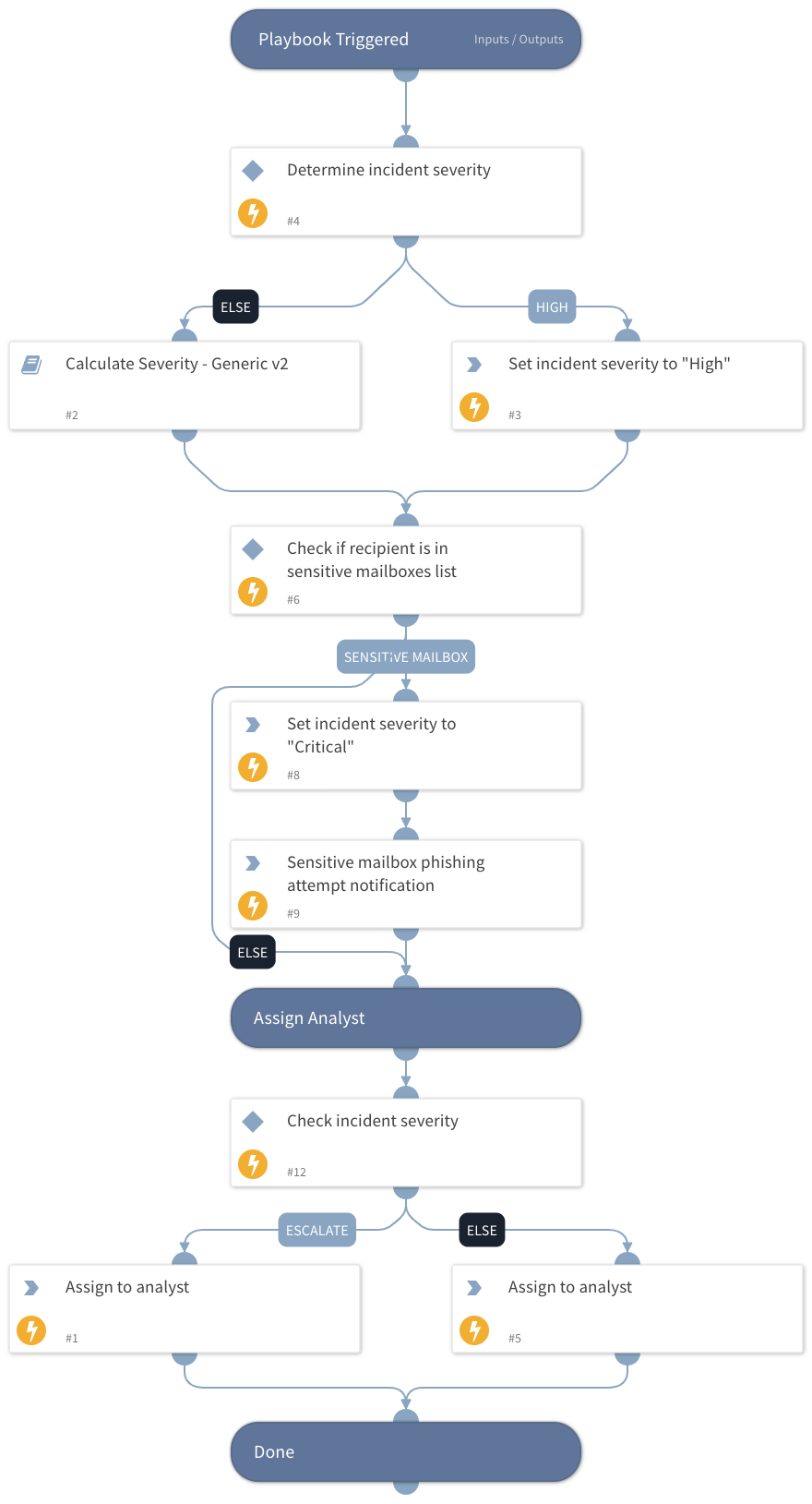
This playbook calculates and assigns the incident severity based on the highest returned severity level from the following calculations:
- Email security alert action
- DBotScores of indicators
- Critical assets
- Email authenticity
- Current incident severity
- Microsoft Headers
Dependencies#
This playbook uses the following sub-playbooks, integrations, and scripts.
Sub-playbooks#
Calculate Severity - Generic v2
Integrations#
This playbook does not use any integrations.
Scripts#
- AssignAnalystToIncident
- IncreaseIncidentSeverity
Commands#
- send-mail
- setIncident
Playbook Inputs#
| Name | Description | Default Value | Required |
|---|---|---|---|
| Role | The default role to assign the incident to. | Optional | |
| escalationRole | The higher tier role to assign the incident to. | Optional | |
| OnCall | Set to True to assign only to analysts on the current shift. | Optional | |
| AuthenticityCheck | Indicates the email authenticity resulting from the EmailAuthenticityCheck script. Possible values are: Pass, Fail, Suspicious, and Undetermined. | Optional | |
| MicrosoftHeadersSeverityCheck | This value is set by the "Process Microsoft's Anti-Spam Headers" playbook, which calculates the severity after processing the PCL, BCL and PCL values in Microsoft headers. | Optional | |
| SOCEmailAddress | The SOC email address to set if the playbook handles an email security alert. | Optional | |
| EmailTo | The email recipient. | Optional | |
| blockedAlertActionValue | A comma-separated list of optional values the email security device returns for blocked\denied\etc. emails. | Optional |
Playbook Outputs#
There are no outputs for this playbook.
Playbook Image#