Prisma Cloud Compute - Audit Alert v3
This Playbook is part of the Prisma Cloud Compute by Palo Alto Networks Pack.#
Supported versions
Available on Cortex XSOAR (versions 6.10.0 and later) and Cortex XSIAM.
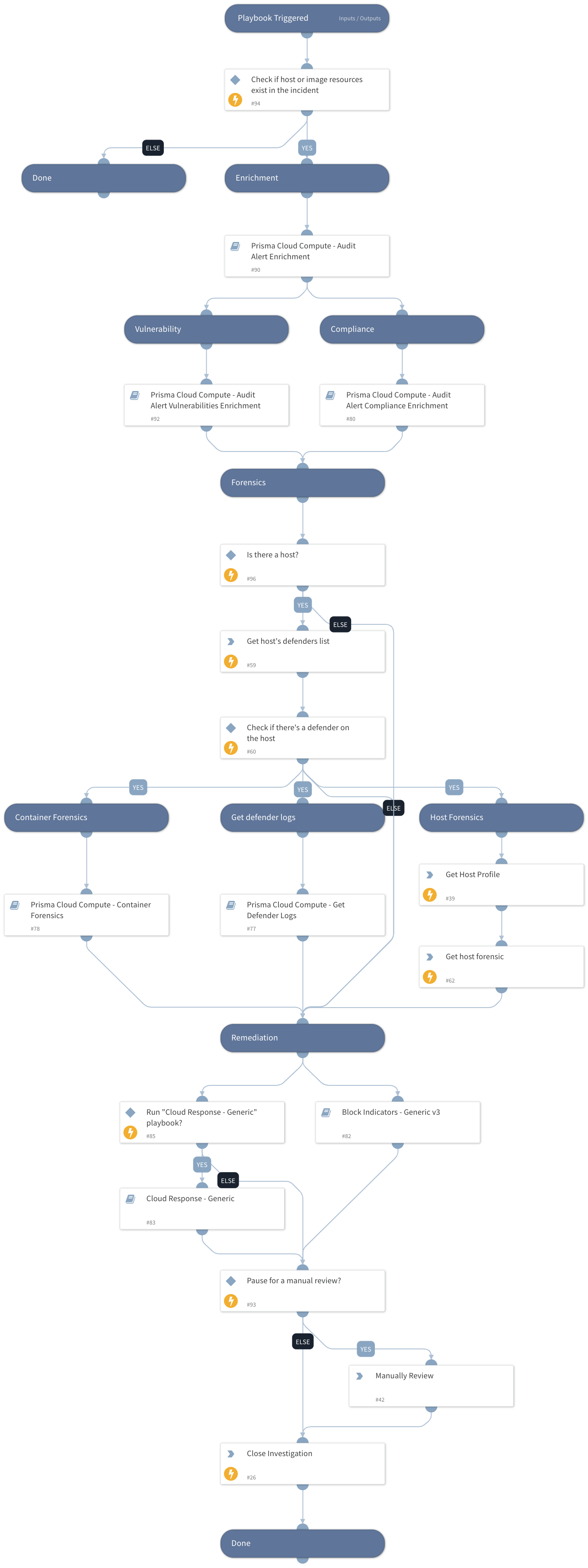
Default playbook for parsing and enrichment of Prisma Cloud Compute audit alerts. The playbook has the following sections: Enrichment:
- Image details
- Similar container events
- Owner details
- Vulnerabilities
- Compliance details
- Forensics
- Defender logs.
Remediation:
- Block Indicators - Generic v3
- Cloud Response - Generic
- Manual Remediation
Currently, the playbook supports incidents created by Runtime and WAAS triggers.
Dependencies#
This playbook uses the following sub-playbooks, integrations, and scripts.
Sub-playbooks#
- Prisma Cloud Compute - Audit Alert Vulnerabilities Enrichment
- Cloud Response - Generic
- Block Indicators - Generic v3
- Prisma Cloud Compute - Audit Alert Enrichment
- Prisma Cloud Compute - Container Forensics
- Prisma Cloud Compute - Get Defender Logs
- Prisma Cloud Compute - Audit Alert Compliance Enrichment
Integrations#
PaloAltoNetworks_PrismaCloudCompute
Scripts#
PrismaCloudComputeParseAuditAlert
Commands#
- prisma-cloud-compute-profile-host-list
- prisma-cloud-compute-host-forensic-list
- prisma-cloud-compute-defenders-list
- closeInvestigation
Playbook Inputs#
| Name | Description | Default Value | Required |
|---|---|---|---|
| baseUrl | The base URL of the Prisma Cloud Compute Instance used to create a link back to the alerts for an image. | https://app.prismacloud.io | Optional |
| Project | A specific project name to get alert profiles for | PrismaCloudCompute.AlertProfiles.ServiceNow.Project | Optional |
| AutoBlockIndicators | Relevant to the "Block Indicators - Generic v3" playbook. Possible values: True/False. Default: True. Should the given indicators be automatically blocked, or should the user be given the option to choose? If set to True - no prompt will appear, and all provided indicators will be blocked automatically. If set to False - the user will be prompted to select which indicators to block. | False | Optional |
| autoResourceRemediation | Relevant to the "Cloud Response - Generic playbook". Whether to execute the resource remediation flow automatically. Available options: - True - False | False | Optional |
| resourceRemediationType | Relevant to the "Cloud Response - Generic playbook". Available options: - Stop - Delete | Stop | Optional |
| autoAccessKeyRemediation | Relevant to the "Cloud Response - Generic playbook". Whether to execute the access key remediation flow automatically. Available options: - True - False | False | Optional |
| accessKeyRemediationType | Relevant to the "Cloud Response - Generic playbook". Choose the remediation type for the user's access key. Available types: Disable - for disabling the user's access key. Delete - for the user's access key deletion. | Disable | Optional |
| userRemediationType | Relevant to the "Cloud Response - Generic playbook". Whether to execute the user remediation flow automatically. Choose the remediation type for the user involved. - Disable - for disabling the user (GCP + Azure) or revoking the user's credentials (AWS). - Delete - for deleting the user. | Disable | Optional |
| autoUserRemediation | Relevant to the "Cloud Response - Generic playbook". Whether to execute the user remediation flow automatically. Available options: - True - False | False | Optional |
| CloudResponseFlow | Whether to run the Cloud Response - Generic playbook. Available options: - True - False | True | Optional |
| ManualRemediation | Whether to allow the analyst to manually review the alert before the playbook ends. Available options: - True - False | Optional |
Playbook Outputs#
There are no outputs for this playbook.
Playbook Image#