Rubrik IOC Scan v2 - Rubrik Polaris
This Playbook is part of the Rubrik Security Cloud Pack.#
Supported versions
Available on Cortex XSOAR (versions 6.0.0 and later) and Cortex XSIAM.
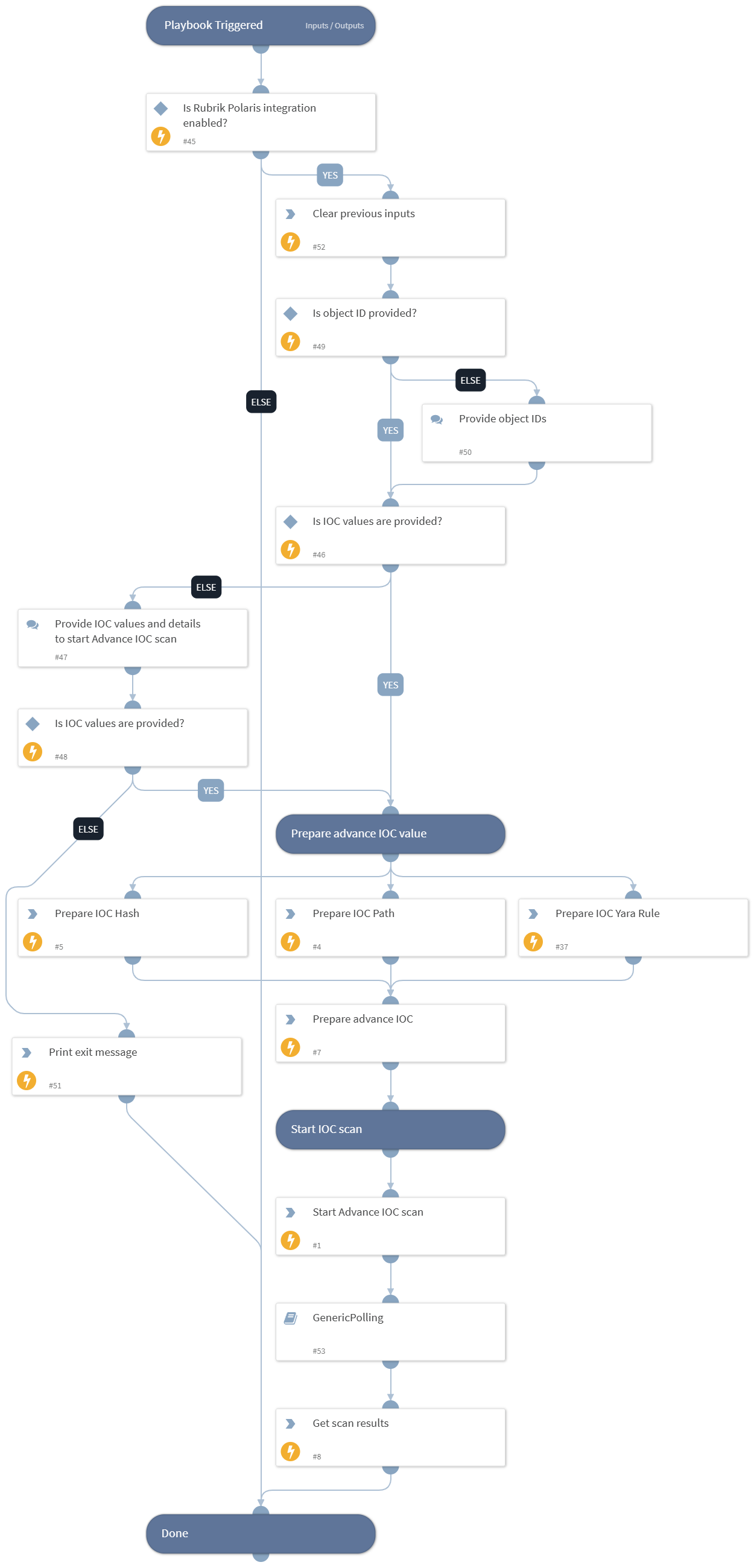
This playbook starts an advance IOC Scan with the provided IOC values and shows the results upon completion.
Dependencies#
This playbook uses the following sub-playbooks, integrations, and scripts.
Sub-playbooks#
- GenericPolling
Integrations#
This playbook does not use any integrations.
Scripts#
- DeleteContext
- Set
Commands#
- rubrik-advance-ioc-scan
- rubrik-ioc-scan-results-v2
Playbook Inputs#
| Name | Description | Default Value | Required |
|---|---|---|---|
| object_ids | The Object ID of the system on which to perform the scan. Supports comma separated values. Note: Users can get the list of object IDs by executing the "rubrik-polaris-objects-list" command. | incident.rubrikpolarisobjectid | Required |
| start_date | Filter the snapshots from the provided date. Any snapshots taken before the provided date-time will be excluded. Formats accepted: 2 minutes, 2 hours, 2 days, 2 weeks, 2 months, 2 years, yyyy-mm-dd, yyyy-mm-ddTHH:MM:SSZ, etc. | 7 days | Optional |
| end_date | Filter the snapshots until the provided date. Any snapshots taken after the provided date-time will be excluded. Formats accepted: 2 minutes, 2 hours, 2 days, 2 weeks, 2 months, 2 years, yyyy-mm-dd, yyyy-mm-ddTHH:MM:SSZ, etc. | now | Optional |
| ioc_path | Path of IOC to scan. Supports comma separated multiple values. Note: Do not provide quoted values. Provide the values in proper JSON format (Example: C:\\Users\\Malware_Executible.ps1). | Optional | |
| ioc_hash | Hash of IOC to scan. Supports comma separated multiple values. Note: Do not provide quoted values. | Optional | |
| ioc_yara_rule | Yara Rule(s) for IOC scan. Note: Do not provide quoted values. Provide the values in proper JSON format. | Optional | |
| polling_interval | Frequency that the IOC scan command will run (minutes). | 5 | Optional |
| polling_timeout | Amount of time to poll before declaring a timeout and resuming the playbook (in minutes). | 720 | Optional |
| paths_to_include | Paths to include in the scan. Supports comma separated values. Note: Do not provide quoted values. Format accepted: path_to_include_1, path_to_include_2. | Optional | |
| paths_to_exclude | Paths to exclude from the scan. Supports comma separated values. Note: Do not provide quoted values. Format accepted: path_to_exclude_1, path_to_exclude_2. | Optional | |
| paths_to_exempt | Paths to exempt from exclusion. Supports comma separated values. Note: Do not provide quoted values. Format accepted: path_to_exempt_1, path_to_exempt_2. | Optional | |
| scan_name | Name of the new advanced threat hunt scan. | PAXSOAR-1.6.0 | Optional |
| max_file_size | Maximum size of the file in bytes that will be included in the scan. The maximum allowed size is 15000000 bytes. | 5000000 | Optional |
| min_file_size | Minimum size of the file in bytes that will be included in the scan. The maximum allowed size is 15000000 bytes. | 1 | Optional |
| max_matches_per_snapshot | Maximum number of IOC matches allowed per snapshot. | Optional | |
| max_snapshots_per_object | Maximum number of snapshots to scan per object. | Optional |
Playbook Outputs#
| Path | Description | Type |
|---|---|---|
| RubrikPolaris.IOCScan | The results of the IOC scan. | unknown |
Playbook Image#