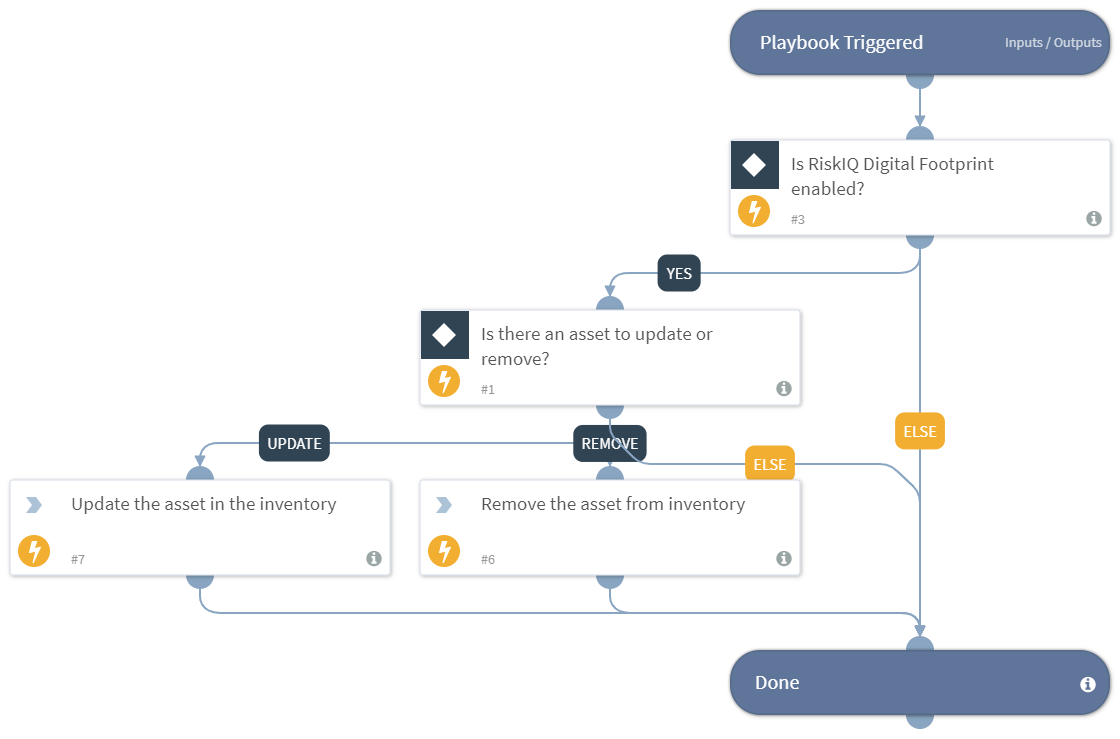
Auto Update Or Remove Assets - RiskIQ Digital Footprint
This Playbook is part of the RiskIQ Digital Footprint Pack.#
Supported versions
Available on Cortex XSOAR (versions 6.0.0 and later) and Cortex XSIAM.
This playbook automatically updates or removes the provided asset(s) from the RiskIQ Digital Footprint inventory according to the values provided. Use this playbook as a sub playbook and loop over each asset in the asset list in order to update or remove multiple assets. Supported integration:
- RiskIQ Digital Footprint
Dependencies#
This playbook uses the following sub-playbooks, integrations, and scripts.
Sub-playbooks#
This playbook does not use any sub-playbooks.
Integrations#
- RiskIQ Digital Footprint
Scripts#
This playbook does not use any scripts.
Commands#
- df-update-assets
Playbook Inputs#
| Name | Description | Default Value | Required |
|---|---|---|---|
| assets_to_update | The list of the assets to be updated or removed. The list should have some specific keys used in this playbook. Example of the list: [{"Asset Name": "asset1", "Asset Type": "Domain", "Operation to be performed on the asset: Update or Remove or None": "Update", "Action to be performed on the asset property: Add or Update or Remove": "Add", "Asset State: Candidate or Approved Inventory or Requires Investigation or Dependencies or Monitor Only": "Candidate", "Asset Priority: High or Medium or Low or None": "High", "Is the asset an enterprise asset? true or false": "true", "Brands of the asset": "RiskIQ", "Organizations of the asset": "RiskIQ", "Tags of the asset": "RiskIQ", "Affected target asset types": "Host"}] | Required |
Playbook Outputs#
There are no outputs for this playbook.
Playbook Image#